
Find Someone on Dating Sites by Phone Number
Learn how to find someone on dating sites by phone number, which free checks confirm an account, and why a clean result doesn't necessarily mean anything.
Guides
Luke Belfield
Sep 16, 2026 • 6 min read


A free reverse phone lookup should be simple, but there are so many tools and services that it can become difficult to keep track of what they're all capable of.
This guide covers what free phone lookup tools actually return, which services are genuinely free versus freemium funnels, and what the "Spam Risk" label on your phone already told you before you opened a browser. It also explains why you can complete most lookups for suspicious numbers in under two minutes without entering payment information anywhere.
A free phone number lookup is the right tool when:
It is not the right tool if you need the caller's full name, current address, social media accounts, or comprehensive background history. Those outcomes require a paid service. The word "free" in your search query does not change this; it is simply the nature of what free-tier data covers.
Before running a lookup, it helps to understand what publicly available phone data actually consists of. This is what the free tier is drawing from.
Whether the number is a landline, cell, or VoIP. This is cheap data, which is why it's free. It is also useful data. VoIP numbers are disproportionately associated with scam operations because they are inexpensive, disposable, and can be assigned any area code the operator wants. A VoIP line with no verifiable registration history is a meaningful signal worth paying attention to.
The area code and sometimes the city the number was originally registered in – not where the caller is now. Not even close, in many cases. A 646 number does not mean Manhattan. It may mean someone in a call center in a country you've never visited who bought a New York area code because it sounds local to you.
If the number is attached to a publicly listed business or directory record, a free tool may return that name. Landlines registered to businesses are the easiest. Personal cell numbers are harder. Ported numbers (numbers people carried from one carrier to another when they switched plans) may return old data, wrong data, or no data.
Whether other people have flagged this number as a robocall, scam attempt, or telemarketer. This is crowdsourced. It is also frequently the most useful thing you will find. Four hundred people reporting a number as "Social Security Administration impersonation scam" is a more reliable signal than any name lookup.
If the number called once and didn't leave a voicemail, it could be a one-ring scam. The caller is hoping you'll call back a premium-rate international line. Area codes 268, 473, 649, and 876 are Caribbean numbers that cost you money the moment you return the call. Looking up the number confirms nothing useful. Not calling back is the lookup result you needed.
If the caller claimed to be from a bank, the IRS, or any other institution and left a callback number, do not look up that callback number. Do not call it. Call the institution directly using the number on their official website or the back of your bank card. The callback number was provided by the scammer and will connect you to the scammer. That’s how the scam works.
Free tools are better at confirming something is bad than confirming something is good. The absence of spam reports does not mean the call was safe. Instead, it may mean the number hasn't been reported yet. Scammers cycle through new numbers specifically because fresh numbers have clean records.
The number on your screen may not belong to the person who called you.
The FCC reports billions of calls per year in the United States use spoofed caller IDs. The mechanics are simple and cheap: a caller selects any number they want to display, and that number appears on your screen. The number probably belongs to a real person who has no idea their number has been borrowed for 300 scam attempts today.
When you run a free lookup on a spoofed number, you are looking up the innocent person. You will find accurate information about them, which will not help you, because they are not the person who called you.
This is why spam reports are more useful than name data for suspicious calls. Spam reports attach to the number's calling behaviour. Name data attaches to whoever registered the number, which may be someone who has nothing to do with the call you received.
In 2021, the FCC mandated a framework called STIR/SHAKEN. The framework requires carriers to digitally verify whether the number displayed on your screen is the number that actually made the call.
Calls that fail this verification are flagged. This is what generates the "Spam Risk" and "Scam Likely" labels you see on your screen before you even pick up. Your carrier's fraud detection system has already assessed the call, assigned it a risk score, and surfaced that score as a label on your phone.
The "Spam Risk" label is a free phone number lookup. It ran automatically and beat you to the answer. If your screen already says "Spam Risk," the lookup you're about to run will not tell you anything more useful than what your carrier just told you for free.
These are the tools you're most likely to encounter. Here's what each one actually returns and what it costs to find out.
Classification: Free. Also what you should try first.
What it returns: Everything that has ever been published about this phone number on any indexed website. FTC scam complaint summaries. Reddit threads from people who received the same call. Forum posts. Business listings. Court filings. Ripoff Report entries.
How to use it: Paste the number in quotes into the search bar. Try with dashes and without. Takes 30 seconds.
What to expect: Occasionally solves the problem before you open anything else, which is mildly anticlimactic but preferable to entering your credit card number into a website.
Classification: Actually free.
What it returns: Carrier. Line type. Spam reports. No account required. No credit card field. Results load immediately.
How it works: You enter a number. It tells you things about the number. This is the transaction as advertised.
What to expect: A free tool that works as described.
Limitations: Will not return a name with high confidence. Will not tell you who specifically owns the number. Stops at carrier-level data, which is enough for many situations and not enough for others.
Classification: Crowdsourced caller ID database. Free for basic lookups.
What it returns: Name data if the number appears in TrueCaller's database, which is assembled from the contact books of hundreds of millions of users who installed the app and agreed to share their contacts. This is either a public service or a fascinating privacy consideration depending on your disposition. Probably both.
How it works: If someone saved the number you're looking up as "IRS Scam Do Not Answer" in their phone, and that person uses TrueCaller, you will see that label. If the number belongs to a business that's in many contact books, you'll likely get the business name. Private individuals with unlisted numbers are hit-or-miss.
What to expect: A large, accurate pool of crowdsourced data used by millions of people.
Classification: Legacy directory. Once genuinely free. Now mostly a memory of when the internet was different.
What it returns: The caller's state and potentially their carrier. A note that more information is available starting at $5.99 per month. Occasionally a partial name if the number belongs to a listed landline, which fewer people have every year.
Historical context: Whitepages was once a physical object that arrived at your door once a year and contained the names and numbers of everyone in your city who had a landline. This is where "publicly available" phone data comes from, so you’ll see decades of directory listings, now digitized and gated behind a pricing page.
Classification: Heavily freemium
What it returns: Potentially a name, a state, or an age range before prompting you to subscribe for the full report.
What to expect: A membership will get you much father the basic free experience, although Spokeo does offer "basic" results at no cost.
When Spokeo is appropriate: When you need a comprehensive people profile and are prepared to pay for it. The underlying data is real and reasonably well-maintained.
Classification: Subscription service
What it returns: The name, address, social profiles, dating accounts, photos, family members, and data breach history are all in the report.
The other thing it does: InfoChecker also offers a "Phone Tracking Solution" that works by sending a custom SMS to the number you enter, asking the recipient to share their location. If they consent, their position appears in your dashboard.
When InfoChecker is appropriate: When you need more than carrier data and spam reports and want to know who is actually behind a number, including their identity, online presence, and whether what they've told you matches what's publicly findable. Read the subscription terms before paying.
Classification: Subscription service
What it returns: A results page informing you that a seven-day trial is required to view results. After seven days, you'll revert to the monthly pricing (check BeenVerified's website for details there).
How it works: BeenVerified's search interface is functionally identical to a free lookup tool up until the moment it isn't. The site processes your query, displays a progress bar suggesting it is retrieving results, and then presents the subscription offer as the natural next step in a process that has already begun.
When BeenVerified is appropriate: When you need deep background data, such as voter records, property history, court documents, associated accounts, and are willing to pay a monthly fee for ongoing access. Not appropriate for a one-time lookup of a suspicious phone number at 11:45 PM.
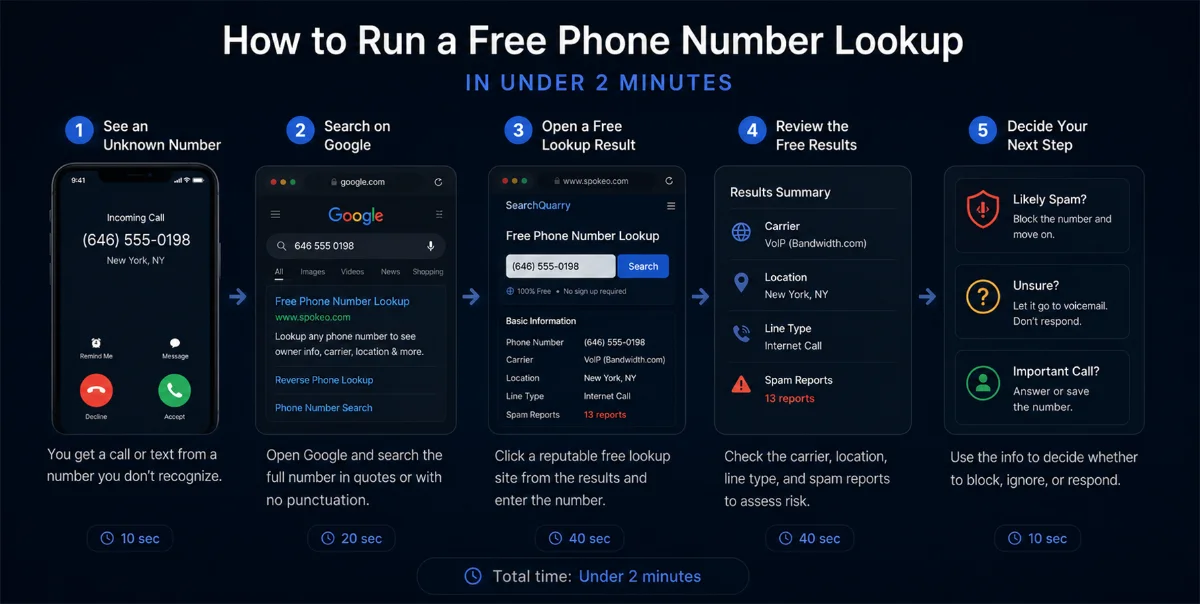
For a number you don't recognize, run the following in order:
Step 1 — Google (0 minutes, $0). Paste the number in quotes. If it's a known scam operation, business, or frequently-discussed number, this will surface it immediately.
Step 2 — NumLookup (30 seconds, $0). Carrier, line type, spam reports. No account required. Confirms whether the number is a VoIP line with a history of complaints or a registered landline with a clean record.
Step 3 — TrueCaller (1 minute, $0). Name identification if the number has been saved by anyone in the TrueCaller network. Most useful for businesses and well-documented scam numbers.
Step 4 — FTC and IC3 databases (ftc.gov, ic3.gov, $0). If the caller claimed to be a government agency, bank, or institution, confirm whether the scam pattern is currently active. Real agencies publish alerts about active impersonation campaigns.
If Steps 1 through 4 produce insufficient information and you need name confirmation, address history, or associated account data, proceed to a paid reverse phone lookup. The information exists. The free tools were not withholding it from you; they genuinely don't have it at the free tier.
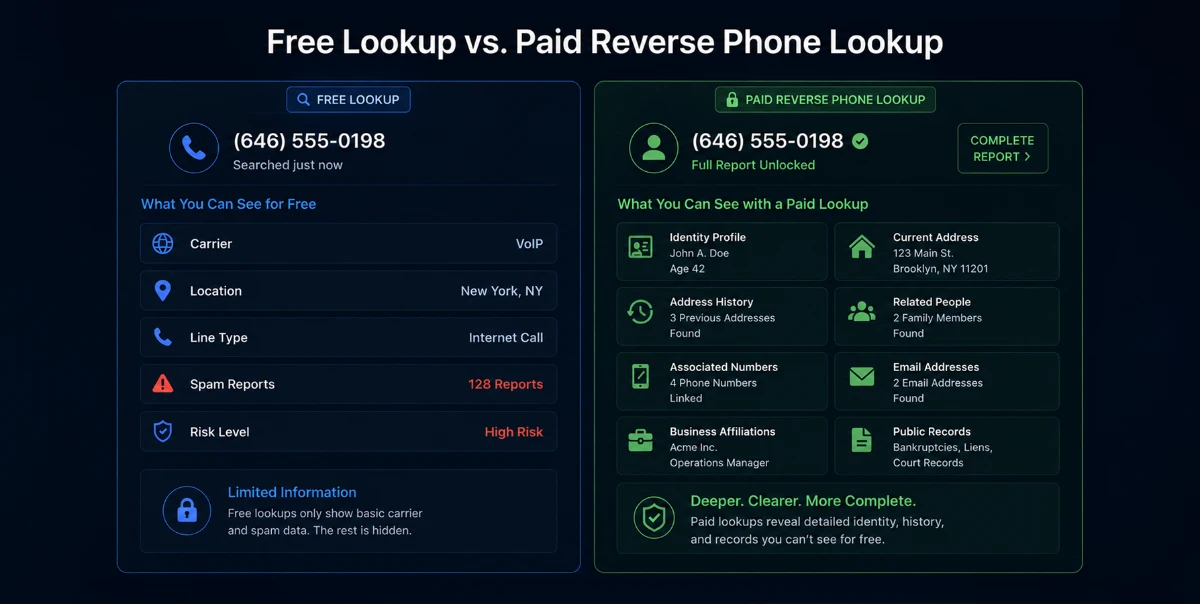
Free tools answer one question well: Is this number suspicious?
They answer poorly, or not at all: Who specifically does this number belong to?
If you have a legitimate reason to confirm a caller's identity, such as reconnecting with someone, verifying a business contact, or researching a number that appeared in a legal or personal matter, a paid reverse phone lookup is the appropriate next step. The data is real, reasonably maintained, and worth paying for when the stakes justify it.
ClarityCheck's reverse phone lookup surfaces publicly available name associations, carrier data, and spam reports in one search.
Learn how to find someone on dating sites by phone number, which free checks confirm an account, and why a clean result doesn't necessarily mean anything.
Should you call someone who blocked you? What *67 really does, why voicemail still lands, what never works, and the legal line you should not cross.
A salvage title means the car was totaled. Learn what triggers the brand, whether you can insure or finance it, and how to check any VIN before you buy.